Speech masking
Speech masking adds a soft, shaped sound underneath the music so conversations nearby stop being easy to follow. It doesn't make a room quieter — it makes words harder to pick out, which is what a treatment room, a front desk, or an open office actually needs.
Where to find it
- Web player: tap the ear button on the player, next to the genre picker. Turn on Speech masking, then set the level.
- iPhone, iPad, and Mac: tap the ear button at the top of the player.
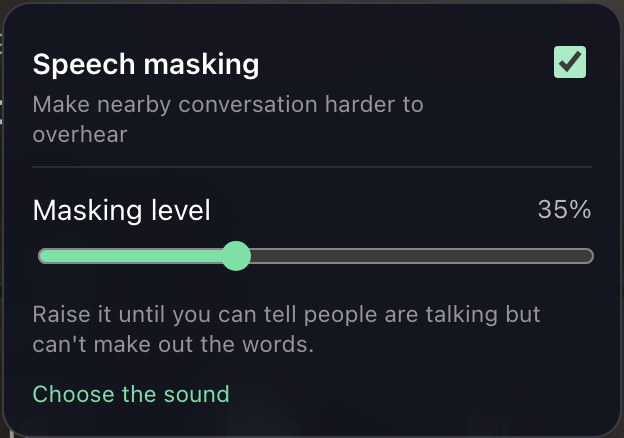
Setting the level
The level is separate from the music volume on purpose. Masking works on the balance between the sound and the voices, so it needs its own control.
- Raise it until you can tell someone is talking but can't make out the words. That is the point where it is doing its job.
- Most rooms land between a third and two thirds.
- If it is drawing attention to itself, it is too high. If you can follow a conversation across the room, it is too low.
Choosing the sound
Four sounds are offered, and they all play at the same loudness — the choice only changes their character.
- Warm — the recommended one. Weighted low, with the edge taken off the top. Hides words nearly as well as Focused while drawing much less attention to itself.
- Focused — sits on the frequencies that carry consonants, so it hides words at the lowest level. Also the most noticeable, as a soft hiss.
- Even — a steady, neutral wash, close to quiet air conditioning. The familiar office sound.
- Voice-shaped — shaped like the average speaking voice. Blends in well, but needs the most level to actually hide words.
What it can and can't do
- Masking hides words, not sound. The room will not get quieter, and someone will still hear that a conversation is happening.
- It is not soundproofing, and it is not a substitute for a closed door. For a conversation that must not be overheard at all, use a private room.
- It belongs to the device it is set on, like the daily schedule — the front desk and the treatment room can run different levels.
- Masking follows playback: pause the music and the sound stops with it.
- On AirPlay the music is handed straight to the speaker, so the masking sound stays on the device rather than following it. Where masking matters, play to the room from the device driving the speakers.